

Concept
In well-regulated environments, keeping EC2 instances up-to-date from an OS security perspective is often a requirement. This can become a time-consuming, hands-on effort for various teams involved in patching—often expected to be executed quarterly.
This article demonstrates an alternative approach: leveraging automation to replace EC2 instances with new, freshly patched, and secured AMIs instead of performing hands-on patching.
While this process may not be applicable across all types of instances, applying it to a good extent can help speed up patching, saving time and effort. Furthermore, the article assumes that user-init is applied, ensuring that EC2 instance deployments are self-contained processes requiring no further manual intervention.
A key benefit is that instances deployed via Auto Scaling Groups (ASGs) (even if the group is set to a minimum size of 1) will naturally increase uptime and availability, as instances that become unavailable are automatically replaced by ASG policies.
Initial Deployment (Before Patching)
The initial deployment involves a CloudFormation stack that deploys:
- Launch Template
- Auto Scaling Group
The CloudFormation stack will use:
- An initial AMI ID
- The ASG template is configured with:
UpdatePolicywhereWillReplaceis set totrueLaunchTemplateIdis set toLatestVersionNumber(ensuring that the ASG uses the latest version of the Launch Template)
Illustrating the Concept
- During Stack Initial Deployment, an AMI ID is Provided:

- Launch Template and Auto Scaling Group: Part of the CloudFormation template involves creating a Launch Template and an Auto Scaling Group that references the Launch Template for EC2 deployments. Besides the AMI ID, the Launch Template also helps to ensure consistent resource tags, network configurations, and storage settings. This ensures that each new instance deployment follows a “cookie-cutter” approach, resulting in identical configurations.
Within the Launch Template, the initial EC2 deployment data is added. This would be equivalent to runningec2-metadata -don an EC2 instance after deployment.

The AutoScalingGroup points to the LaunchTemplate above to use whatever noted there to be used and configured during an EC2 deployment.

- To be able to keep track the AMI ID gets tracked during instance deployment
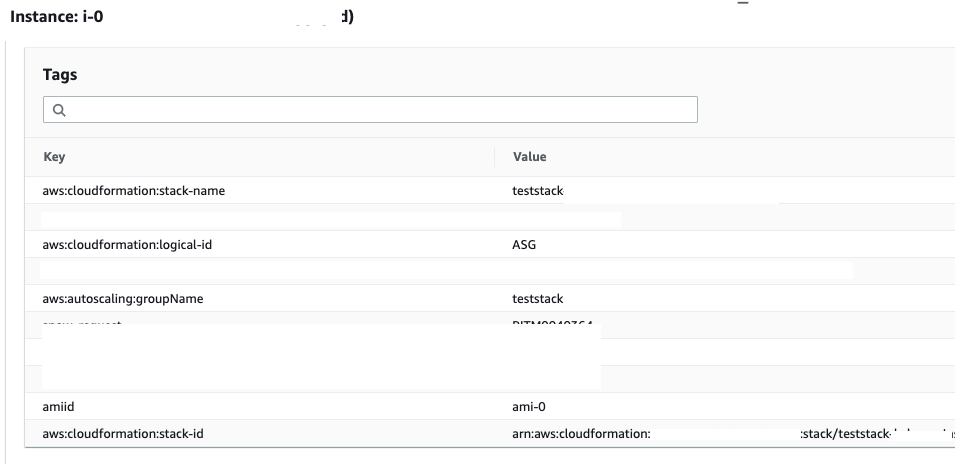
Resource Tags will be set per deployed EC2 instance automatically. Given it is a CloudFormation based deployment also the relevant CloudFormation tags get set automatically during deployment as well as the AutoScalingGroup name is noted as a resource tag.
 Cloud Architecture, Solutions and Designs
Leave a comment