
In cloud environments, maintaining infrastructure is crucial for cloud providers to keep data centers up-to-date. AWS typically performs live updates with minimal impact, but some may affect services like EC2 instances. AWS notifies account holders via email and the AWS Health Dashboard, but these methods lack scalability and automation capabilities, requiring manual checks that can lead to missed announcements.
The Need for Automation
In larger organizations with hundreds or thousands of EC2 instances across multiple teams, automating maintenance announcements is not just beneficial but necessary. This automation can prevent potential downtime and ensure business continuity.
Automated Solutions
Automation triggered by notification events can execute various actions, such as:
- Full EC2 Instance Stop and Start: Automatically restart instances to minimize downtime.
- ECS Task Relaunch: Restart ECS tasks to ensure service continuity.
- Custom Notifications: Send alerts via email, Slack, or Teams based on service tags.
- Automated Remediation: Address Opensearch health notifications or perform RDS-related activities.
- Infrastructure Notifications: Trigger region switches for applications if needed.
These use cases demonstrate how automation can meet specific business needs efficiently.
Automation Based on Resource Tags
Resource tags are invaluable for identifying services (e.g., Development vs. Production vs. Testing). Properly used, they can trigger automated actions based on service categorization.
A few thoughts around Resource Tags are collected in this post: https://into-the-cloud.mechmann.com/2020/06/24/resource-tags-in-cloud-deployments/
Asset Management-Driven Approach
Maintaining a repository of deployed instances using the AWS EC2 Describe API can provide similar insights. This can be automated daily using an AWS Lambda function.
Monitoring-Driven Approach
Monitoring applications such like Zabbix which collect instance level metrics through an agent can be used to read/pull the instance metadata.
A so called Template with an Item would be created. Alongside the Agent a so called UserParameter would be created which returns the EC2 metadata as a JSON formatted output
curl http://169.254.169.254/latest/meta-data/events/maintenance/scheduled
The UserParameter would be assigned to the Item where a schedule would be set (i.e. it would be executed once a day). A so called Trigger can be created to initiate an automated execution through the AWS EC2 API this then pre-checked for execution by validation of a given and correctly set resource tag.
Since this Post is about the AWS EC2 Maintenance Announcement the Monitoring driven approach stays high level described.
Asset Management driven
In case a repository of all deployed instances is collected throughout a day to maintain a library of workloads and how/where those are deployed to the AWS EC2 Describe API can provided similar information as described above in the Monitoring driven approach.
The daily data collection could be done via an AWS Lambda function.
Event-Driven via AWS CloudWatch
CloudWatch Event Rules can initiate actions based on instance retirement announcements. By using the AWS_EC2_PERSISTENT_INSTANCE_RETIREMENT_SCHEDULED eventTypeCode, you can automate EC2 instance restarts via AWS Systems Manager (SSM) as well as AWS Lambda.
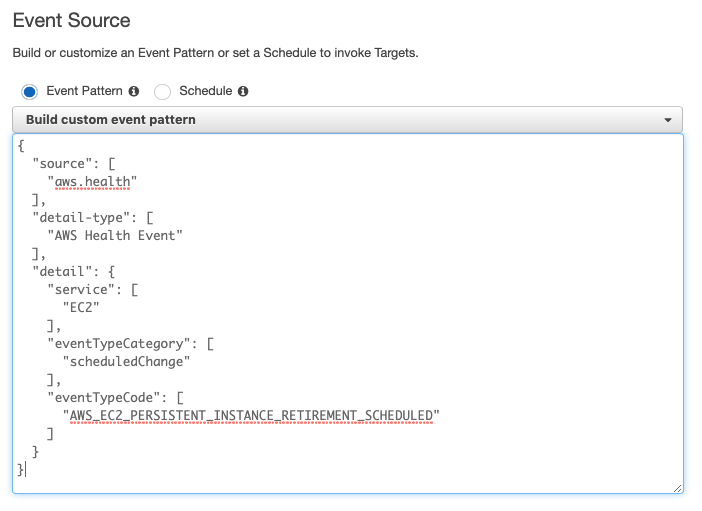
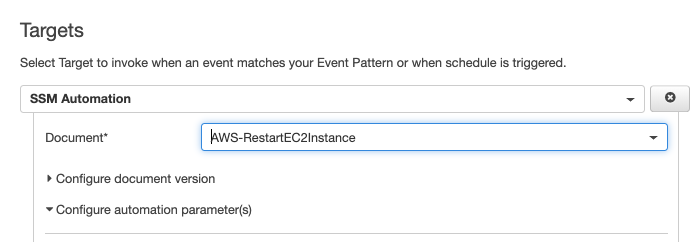
Within the Targets an automation through SSM can be selected where then the event as described above would initiate an EC2 instance restart automatically.
Conclusion
Multiple options are available for automating AWS maintenance announcements, ensuring that business needs are met creatively and effectively. By leveraging these methods, organizations can maintain high reliability and minimize downtime.
 Cloud Architecture, Solutions and Designs
Leave a comment